Friday, October 13, 2006

Using HTTPS with Web Services

Prerequisites:
In this article you have

  • already a Web Service deployed in OC4J that is running on the default HTTP port. The WSDL and Endpoint are available. In my sample the non secure Web Service endpoint is: http://127.0.0.1:8888/math-service/MathServiceSoapHttpPort

Add HTTPS to OC4J

Creating of the Keystore

The first thing to do to secure OC4J would be to create a new keystore that will contain the different certificates. The easiest way to do that for a Java developer is to use SUN's keytool:
keytool -genkey -alias oracle-server -dname "CN=Tug Grall, OU=Blog O=Grall And Co L=Redwood Shores, S=CA, C=US" -keyalg RSA -keypass welcome -storepass welcome -keystore server.keystore
You can copy the server.keystore into the $ORACLE_HOME/j2ee/home/config to simplify the next steps.


Configuring OC4J

OC4J stand alone is using the notion of Web-Site to expose HTTP resources (Web Applications). The default-web-site is define is he $ORACLE_HOME/j2ee/home/config/default-web-site.xml. To secure an OC4J you can follow the steps describe in the OC4J Security guide that I have summarized in the following section.

What we want to achieve for the purpose of the demonstration is to have OC4J using HTTP and HTTPS, on port 8888 and 4443 for example.

1. Copy default-web-site.xml to  secure-web-site.xml

2. Edit the secure-web-site.xml:
    2.1. Change the web-site tag by changing the port to 4443 and adding the element secure="true"
    2.1. Add the ssl-config element and point this to the new created keystore.
    The file looks like:

<web-site   xmlns:xsi="http://www.w3.org/2001/XMLSchema-instance"
            xsi:noNamespaceSchemaLocation="http://xmlns.oracle.com/oracleas/schema/web-site-10_0.xsd"
            port="4443"
            secure="true"
            display-name="OC4J 10g (10.1.3) Default Web Site"
            schema-major-version="10"
            schema-minor-version="0" >
        ...
        <ssl-config keystore="server.keystore" keystore-password="welcome" />
        ...
</web-site>

3. Import the new Web site in your OC4J instance by editing the $ORACLE_HOME/j2ee/home/server.xml file. You need to add or replace the web-site tag. In my case I want to add the secure web site to my instance so the configuration looks like:

    ...   
    <web-site default="true" path="./default-web-site.xml" />
    <web-site path="./secure-web-site.xml" />
    ...

Since we have copied the file from the default-web-site, all applications are available using HTTP and HTTPS

Start OC4J and test the HTTPS port

Start OC4J using the standard Java command or shell script, I am adding the Java Network debug flag that would help you to see what is happening at the SSL level.

    java -Djavax.net.debug=ssl -jar oc4j.jar

You should be able to access the service WSDL using the HTTPS port for example in my case:
  •     https://127.0.0.1:4443/math-service/MathServiceSoapHttpPort?WSDL


Consuming the Service using HTTPS

Generate and configure a client Keystore

Event if this is possible to use the same keystore for the server and the client, I will guide you in the steps to create a client certificate and import the certificate from the existing -server- one. Here the command to create a new keystore:
keytool -genkey -alias oracle-client -dname "CN=John Doe, OU=Blog O=MyDummyClient, S=CA, C=US" -keyalg RSA -keypass welcomeClient -storepass welcomeClient -keystore client.keystore

The next step is to export the certificate from the server keystore to be able to import it in the client:
keytool -keystore server.keystore -export -alias oracle-server -file server.cer

You can now import the cerificate in the client keystore:
keytool -keystore client.keystore -import -file server.cer

Generate the proxy

You have now the client certificate so you can use the Oracle Web Service Assembler to generate the proxy. The only specific thing you have to do is to specify which key store to use when running the tool. The command to use when generating the proxy is:

java -Djavax.net.ssl.trustStore=/Users/tgrall/ssl/client.keystore
     -Djavax.net.ssl.keyStore=/Users/tgrall/ssl/client.keystore
     -Djavax.net.ssl.trustStorePassword=welcomeClient
     -Djavax.net.ssl.keyStorePassword=welcomeClient
     -jar $ORACLE_HOME/webservices/lib/wsa.jar
     -genProxy
     -wsdl https://127.0.0.1:4443/math-service/MathServiceSoapHttpPort?WSDL


Calling the Service using secure endpoint

Configure the Java Environment to use the client store is made using the following System properties:
  • javax.net.ssl.trustStore
  • javax.net.ssl.keyStore
  • javax.net.ssl.trustStorePassword
  • javax.net.ssl.keyStorePassword
       
This could be done using different approach, property file, -D command line parameter or programmatically. To simply the example I am using the programmatic approach, the following code is part of the main method of the Client class:
  ...
   System.setProperty("javax.net.ssl.trustStore", "/Users/tgrall/ssl/client.keystore");
   System.setProperty("javax.net.ssl.keyStore", "/Users/tgrall/ssl/client.keystore");
   System.setProperty("javax.net.ssl.trustStorePassword", "welcomeClient");
   System.setProperty("javax.net.ssl.keyStorePassword", "welcomeClient");
   ...
   // Adding Debug information
   
System.setProperty("javax.net.debug", "ssl");
   ...


It is possible to change the Endpoint dynamically in the Proxy using the setEndpoint method.
  ...
  democlient.proxy.MathServiceSoapHttpPortClient myPort = new democlient.proxy.MathServiceSoapHttpPortClient();
  ...
  String ep = "https://127.0.0.1:4443/math-service/MathServiceSoapHttpPort";
  myPort.setEndpoint(ep);
  System.out.println("Result of the operation is "+ myPort.add(2,2));
  ...


You should now be able to run the client and call the service using HTTPS. This would look like:

JDeveloper: What are my System Properties?

I have been using JDeveloper for many years, since the first release ;-). But I've never payed attention to a simple and very useful feature. When you click the Help > About menu you can access all the System properties of the Java VM used by Jdeveloper by clicking on the Properties tab

JDeveloper System Property Viewer

Thanks to Gerard for the tip....

Thursday, October 12, 2006

Come to Oracle Open World and watch Mr Spring and Mr Apache speak

Oracle Open World is getting very close... And I am very excited to go to lot of sessions, two of them looks very interesting in the Oracle Develop track:

  • Rod Johnson - Spring Update: What's New and Cool in Spring 2.0 (Monday 10/23/2006, 12:45 PM - 1:45 PM in the Hilton Hotel Grand Ballroom A)
  • Brian Behlendorf - Bringing Open Source Software Development Practices and Principles Into Your Company (Tuesday 10/24/2006, 1:15 PM - 2:15 PM in the Hilton Hotel Grand Ballroom A)

This is quite exciting to have Open Source gurus coming to present to the Oracle conference, and explain how to use the new Spring in their projects or leverage Open Source practices to improve development in house... Take a look to the full program of Oracle Develop.

Start to use the Oracle OpenWorld Schedule Builder to organize your week in SF, if you have not registered yet for OOW click here.

Wednesday, October 4, 2006

Configuring the SOAP Address in OracleAS Web Services

When a JAX-RPC service is developped using OracleAS 10g R3 stack, the service URL http://server:port/context/serviceName, provide access to a test page and to the WSDL by adding the ?wsdl parameter to the URL. You can then use this URL to create services client with your tools of choice.

If you take a look to the WSDL, the SOAP address of the SOAP HTTP Port is dynamically generated based on the calling URL, for example if you have a service running on your machine:

http://127.0.0.1:8888/math-service/MathServiceSoapHttpPort?WSDL
will generate the following information in the WSDL
<service name="MathService">
    <port name="MathServiceSoapHttpPort" binding="tns:MathServiceSoapHttp">
        <soap:address location="http://127.0.0.1:8888/math-service/MathServiceSoapHttpPort"/>
    </port>
</service>

But if you are using another URL, for example the name of the computer:
http://tgrall-computer:8888/math-service/MathServiceSoapHttpPort?WSDL
will generate:
<service name="MathService">
    <port name="MathServiceSoapHttpPort" binding="tns:MathServiceSoapHttp">
        <soap:address location="http://tgrall-computer:8888/math-service/MathServiceSoapHttpPort"/>
    </port>
</service>

However in some case you may want to hard code this value to a specific location,for example to be sure that user will use the internet visible name, (no IP or intranet name), to do such thing you can use the  oracle-webservice.xml file and th <web-site> tag. This deployment descriptor is used to configure the service at runtime. In the following example I am forcing the service to use a new hostname and port:

<oracle-webservices xmlns:xsi="http://www.w3.org/2001/XMLSchema-instance"      .... >
    <web-site host="www.grallandco.com" port="80" />
    <webservice-description name="MathService">
        ...
        ...
    </webservice-description>
</oracle-webservices>...

This element and all other Oracle Web Services configuration elements are documented in the Oracle Web Service Developer Guide.

Thursday, September 21, 2006

Accessing User Principal in a Web Service

WS-Security provides a standard way to secure Web Services. Since based on SOAP it is agnostic of the stack you are using. When using JAX-RPC implementation, you are running in a J2EE container. In this post I am giving a tip to access the Principal object.

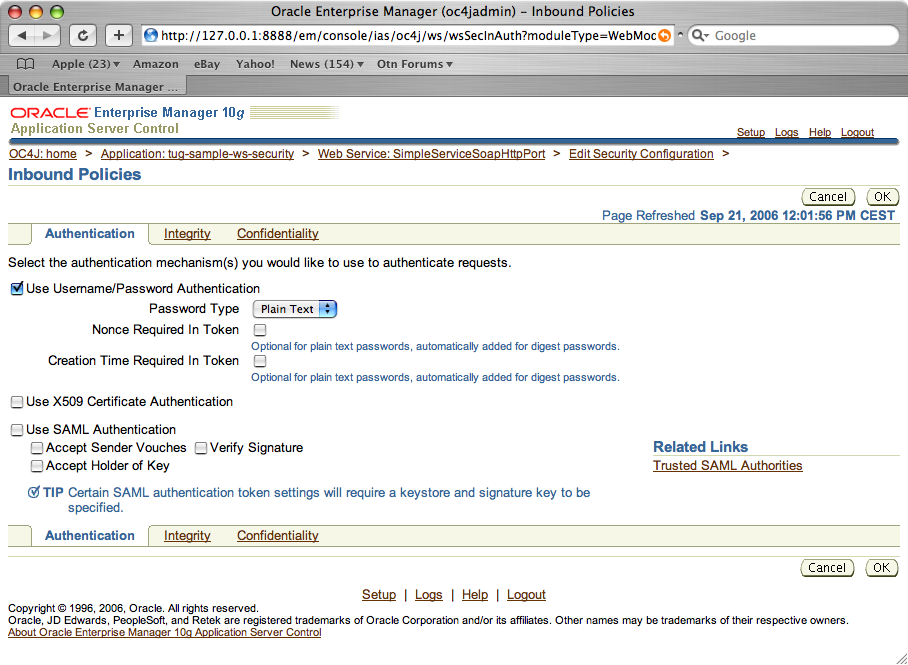
I have a service service, and I need to access some user information in its implementation class ( org.tug.ws.sample.SimpleServiceImpl ). This service is secure with WS-Security, with for example simple authentication, the following screenshot, is the configuration of inbound security in OracleAS 10gR3:

em-ws-sec-001


So the service is secured, here the code that you have to add in your service implementation (or handlers) to access the Principal object.

  1. Implement javax.xml.rpc.server.ServiceLifecycle
  2. Implement the init(Object context) method to access the ServletEndpointContext, that you can for example put as a local member of your implementation class.
        public void init(Object context) {
            _servleContext = (ServletEndpointContext)context;
        }
  3. Then you can access the principal object using the getUserPrincipal() method:
            ...
            if (_servleContext.getUserPrincipal() != null ) {
                Principal userPrincipal = _servleContext.getUserPrincipal();
                ...
            }
            ...
     
You can find more information about the Security in J2EE 1.4 Web Services in the Designing Web Services with the J2EE 1.4 Platform tutorial. 
Update on Wednesday october 4th: Frank Nimphius, has use this entry to create a more detail article about End to End Security with Web Services Security.

Tuesday, September 19, 2006

Choose a scripting language? Groovy or JRuby?

Last week I discussed dynamic languages with some consultants. This discussion was done in the context of integration of scripting technologies into Java EE environment. So the integration to the VM is important, I also think that the learning curve is a thing to consider.

It is true that, like any developer Iike to learn things everyday, this is why I have done some development with PHP, with Ruby On Rails, and obviously with Groovy, Javascript and many other dynamic languages.

The discussion moved quickly to an argument about which language is the best... Hard to say, but I would expect that to be more productive in enterprise it is better to use a "Java Like" syntax that allows you to leverage the power of scripts. Based on this comment it is for me a no brainer to say that Groovy is more interesting to a core Java developer than JRuby (or other Jython, Jacl, ...). I do not even want to go in the details about VM integration, performances and so on...

So in this context, A. Sundararajan has posted a very interesting comparison of Java, Groovy and JRuby syntaxes.

Thursday, May 11, 2006

More Groovy at Javaone !

If like me you like scripting technologies and in particular Groovy and Grails, JavaOne 2006 will be a very good moment to learn more about it.

Beside the official sessions listed below, I would like to inform you of various events interesting for the Groovy community:

  • Informal “Groovy Community Meeting”, Thursday night 5pm around the Oracle Demobooth where Guillaume, Graeme and Dierk will give you an opportunity to learn more about these projects
  • Groovy presentations at the Oracle Booth in the pavillion
    • Intro do Groovy by Harshad Oak : Wednesday 17th at 3pm
    • Groovy In Action by Guillaume Laforge: Tuesday 16 at 5pm
    • Grails by Graeme Rocher: Thursday 18th at 3pm

The official sessions about Groovy and Grails are

BOF-0554 Dynamic Scripting Languages BOF  Tuesday
05/16/2006
10:30 PM - 11:20 PM
Moscone Center
Hall E 133
BOF-2521 Rapid Web Application Development With Grails  Thursday
05/18/2006
08:30 PM - 09:20 PM
Moscone Center
Esplanade 307-310
TS-1246 Simplify Enterprise Development With Scripting  Thursday
05/18/2006
11:00 AM - 12:00 PM
Moscone Center
Hall E 134
TS-3273 Groovy = Java™ Technology+ Ruby + Python for the JVM™  Wednesday
05/17/2006
02:45 PM - 03:45 PM
Moscone Center
Gateway 104
TS-3714 Flash-Gridding with Java™ Technology: Using Project GlassfishSM, Jini™/JavaSpaces™, and Groovy as an Environment for an Open Source, Self-Assembling Supercomputer  Thursday
05/18/2006
02:45 PM - 03:45 PM
Moscone Center
Gateway 104
TS-5386 Groovy Goes RFID with Smart Sensors for Real-World Control  Tuesday
05/16/2006
05:45 PM - 06:45 PM
Moscone Center
Gateway 104