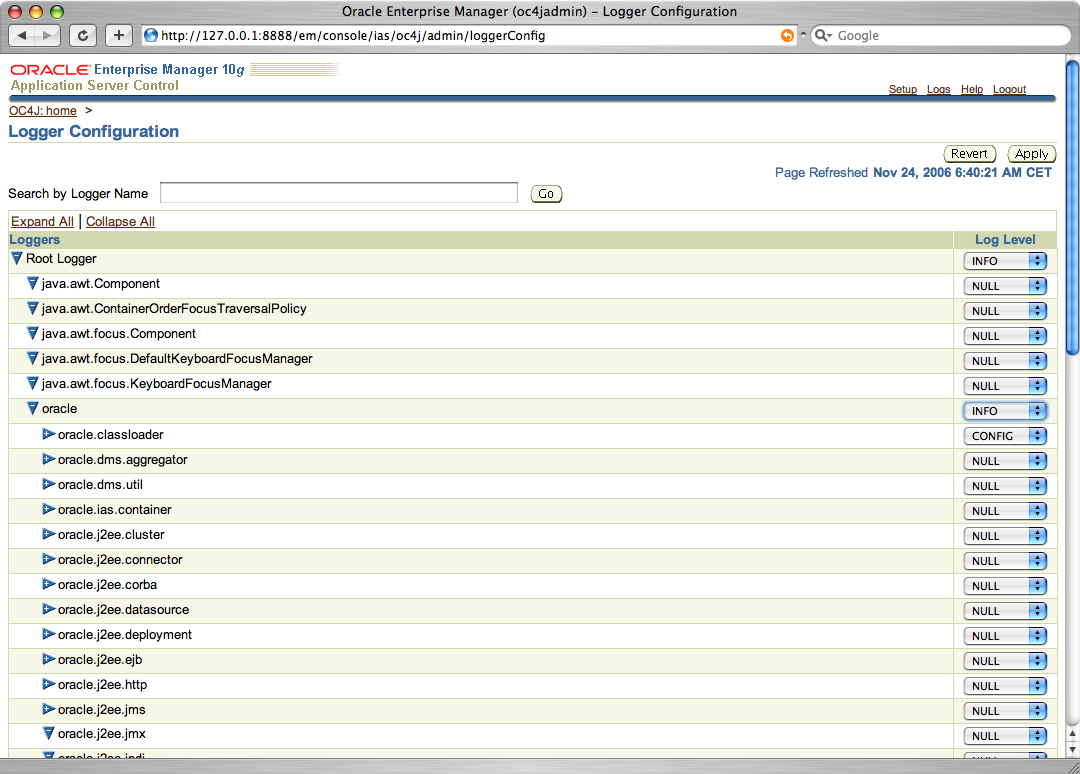
OracleAS 10gR3, so OC4J standalone, is using the standard Java logging framework. Some of the
benefits are easy configuration, and extensibility. The configuration
of the level of logging of the different loggers has been exposes in
the
Oracle Application Server Console. To see the logger configuration,
click on the Administration Tab and then Logger Configuration, you can
then configure the different loggers.
By default the logger will write all the information in the default
log.xml file, and for
application lever logger it will go in the application.log. You may
want to send the information in the console during development to
debug/analyze your application. This is done using the configuration of
the Handler. This information is currently not available in the
Application Server Console, so I am documenting in the next steps how
to
send the information in the console (terminal window).
The configuration of the OracleAS Logging is saved in the
$ORACLE_HOME/j2ee/home/config/j2ee-logging.xml
file. In this file you can see that Oracle has defined
various
handlers where information can be sent:
- console-handler
: Log the information in the console (the one we want to use in this
sample)
- oc4j-handler
: the default handler for most of the loggers, saving the information
in the $ORACLE_HOME/j2ee/home/log/oc4j/log.xml
using the Oracle Logger formatting
- oracle-webservices-management-auditing-handler
: the handler used by the Web Services Auditing feature in the $ORACLE_HOME/j2ee/home/log/wsmgmt/auditing/log.xml
- oracle-webservices-management-logging-handler
: the handler used by the Web Service Logging feature in the $ORACLE_HOME/j2ee/home/log/wsmgmt/logging/log.xml
As you may know, OracleAS Web Service provides out of the box support
for Auditing of the SOAP messages. You just need to go in the
administration page of the Web Service and enable the auditing. By
default the messages are logged in the auditing log pointed above. But
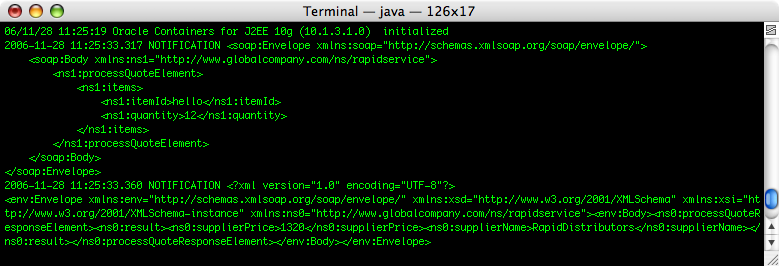
during development it is really interesting to see the SOAP Messages in
the console without having to configure a Proxy to capture the
request/response. The easiest way to do that is to edit the
j2ee-logging.xml file and
associate the
console-handler
to the auditing logger using the following configuration:
      <logger name="oracle.webservices.management.auditing" level="NOTIFICATION:1" useParentHandlers="false">

         <handler name="oracle-webservices-management-auditing-handler"/>

                 <handler name="console-handler"/>

      </logger>
by doing this you will see the SOAP Message in the OC4J console that is
running in your system.
You can also use this configuration with any loggers available in OC4J.

 As Mac user I sometimes need to use Windows (too often...) or Linux computer, and for this I have been using either my PC or
  The groovy project gets funding for its development. Big Sky is hiring
  Speaking at this month's meeting will be Graeme Rocher, Grails Project Lead and CTO at Skills Matter. During his talk entitled; Grails Dynamic Tags: Making Tag Libraries Agile, Graeme will discuss Groovy Server Pages and its support for the creation of dynamic tag libraries without the need for configuration.
John Wilson, Groovy Committer, will also be presenting at this meeting. During his talk, entitled; The MetaClass: How Groovy works Under the Hood, John will shed light on the MetaClass so you can better understand its' function and see how to use it to get your Groovy programs smaller, clearer and faster.
Speaking at this month's meeting will be Graeme Rocher, Grails Project Lead and CTO at Skills Matter. During his talk entitled; Grails Dynamic Tags: Making Tag Libraries Agile, Graeme will discuss Groovy Server Pages and its support for the creation of dynamic tag libraries without the need for configuration.
John Wilson, Groovy Committer, will also be presenting at this meeting. During his talk, entitled; The MetaClass: How Groovy works Under the Hood, John will shed light on the MetaClass so you can better understand its' function and see how to use it to get your Groovy programs smaller, clearer and faster.